Wednesday, 17 December 2025

81 - Class 11 Computer Science with Python Practical File

Program: 81: Write a Python program to create NewList which contains all the values of original list after removing duplicate values. Also display the NewList.


OriginalList = [10, 20, 30, 20, 40, 10, 50, 30]

NewList = []

for item in OriginalList:

    if item not in NewList:

        NewList.append(item)

print("NewList:", NewList)


Output:


NewList: [10, 20, 30, 40, 50]

80 - Class 11 Computer Science with Python Practical File

Program 80: Write a program in Python to create a list of words which start and end with the same letter from a given string S="window apple wow table taught pencil comic'. The output should be: ['window', 'wow', 'taught', 'comic']


S = "window apple wow table taught pencil comic"

# Split the string into words

words = S.split()

# Create list of words starting and ending with same letter

result = []

for word in words:

    if word[0] == word[-1]:

        result.append(word)


# Display the result

print(result)


Output:

['window', 'wow', 'taught', 'comic']

79 - Write a Python program to input 10 numbers to store in the list and print the third largest number.

Write a Python program to input 10 numbers to store in the list and print the third largest number.


# Input 10 numbers

numbers = []

for i in range(10):

    num = int(input("Enter number: "))

    numbers.append(num)


# Sort the list in descending order

numbers.sort(reverse=True)


# Print the third largest number

print("Third largest number:", numbers[2])


Output:

Enter number: 5

Enter number: 9

Enter number: 7

Enter number: 2

Enter number: 6

Enter number: 4

Enter number: 8

Enter number: 9

Enter number: 15

Enter number: 14

Third largest number: 9

78 - Write a program in Python that accepts students names in the form of a tuple as an input from the user and then displays only those students' names that start with letter 'S' or 's'.

Write a program in Python that accepts students names in the form of a tuple as an input from the user and then displays only those students' names that start with letter 'S' or 's'.


# Accept student names from the user

names = eval(input("Enter a tuple of student names: "))


print("Students whose names start with 'S' or 's':")

for name in names:

    if name.startswith('S') or name.startswith('s'):

        print(name)


Output:


Enter a tuple of student names: ('Amit','Sumit','Rohit','Sonu')

Students whose names start with 'S' or 's':

Sumit

Sonu

77 - Write a program in Python that repeatedly asks the user to input Student's Name and Class and store it in a dictionary D, whose keys are Student's Name and values are Student's Class. Then display the dictionary

Write a program in Python that repeatedly asks the user to input Student's Name and Class and store it in a dictionary D, whose keys are Student's Name and values are Student's Class. Then display the dictionary


D = {}

while True:

    name = input("Enter Student's Name: ")

    student_class = input("Enter Student's Class: ")


    D[name] = student_class


    choice = input("Do you want to add another student? (yes/no): ")

    if choice.lower() == "no":

        break

print("Student Dictionary:")

print(D)


Output:


Enter Student's Name: Amit

Enter Student's Class: 11

Do you want to add another student? (yes/no): yes

Enter Student's Name: Sumit

Enter Student's Class: 10

Do you want to add another student? (yes/no): yes

Enter Student's Name: Mohit

Enter Student's Class: 12

Do you want to add another student? (yes/no): yes

Enter Student's Name: Rohit

Enter Student's Class: 11

Do you want to add another student? (yes/no): no

Student Dictionary:

{'Amit': '11', 'Sumit': '10', 'Mohit': '12', 'Rohit': '11'} 

76 - Write a program in Python that takes a string as an input and displays it if its length is greater than 5.

Write a program in Python that takes a string as an input and displays it if its length is greater than 5.


# Take input from the user

text = input("Enter a string: ")


# Check length of the string

if len(text) > 5:

    print(text)

else:

    print("Length is not greater than 5")


Output:

Enter a string: Python
Python

OR

Enter a string: Ram
Length is not greater than 5

75 - Write a program in Python that takes a list of integer from the user and displays the number of even elements

Write a program in Python that takes a list of integer from the user and displays the number of even elements


# Take input from the user
numbers = eval(input("Enter a list of interger: "))

# Count even numbers
count = 0
for num in numbers:
    if num % 2 == 0:
        count += 1

# Display result
print("Number of even elements:", count)


Output:

Enter a list of interger: [5,2,9,4,8,7,3]
Number of even elements: 3

Sunday, 7 December 2025

International Computer Science Teachers Week (14–20 December 2025)

International Computer Science Teachers Week (14–20 December 2025)

Online Article, Essay, Poster & Banner Writing Competition


Dear Students,

As you know, 19 December is celebrated as International Computer Science Teachers Day, and this year, 14–20 December 2025 will be observed as International Computer Science Teachers Week. As part of the celebration of International Computer Science Teachers Week (14–20 December 2025), we are organizing an Online Article, Essay, Poster, and Banner Writing Competition.


🎯 Competition Categories


Article Writing – Topic related to Computer Science, Technology, AI, or Digital Innovation.


Essay Writing – 400–600 words on themes such as the role of CS teachers, impact of technology, future of computing, etc.


Digital Poster/Banner Making – Themes:


  • International Computer Science Teachers Week
  • Artificial Intelligence
  • Cyber Safety
  • Coding Culture
  • Digital Empowerment


📅 Important Details


Mode: Online Submission


Last Date for Registration: 12 December 2025


Submission Deadline: 18 December 2025


Result Announcement: 19 December 2025


📌 Registration


Students who wish to participate must register using the link below on or before 06 December 2025.

Registration Link: 


https://docs.google.com/forms/u/3/d/10zBu-8N6q0x2eVQwtUjz3zARbPcbbAns44C5RpUD0Ik/preview


We encourage all interested students to showcase their creativity, digital skills, and knowledge of Computer Science.

Let’s celebrate this week with innovation, inspiration, and enthusiasm!


All teachers are requested to kindly share this information in their respective schools as well.

Winners of the competition will be awarded prizes and certificates for their outstanding performance.


Students are requested to email their articles, essays, digital posters/banners, etc. to

support@spsharmag.com

 in any of the following formats: WORD / PDF / JPG / PNG before or on 18 Dec 2025


– Computer Science Department

Thursday, 18 September 2025

आइये हम स्वयं को "Re-Routing" मोड पर रखें

Life Lesson छुपा है Google Maps में, पढ़िए ज़रूर 👇

री-रूटिंग :
Re-Routing : 
क्या आपने गौर किया है कि अगर आप गलत मोड़ लेते है, तो Google मानचित्र कभी भी चिल्लाता नहीं है, निंदा या आपको डांटता नहीं है।
यह कभी अपनी आवाज ऊँची नहीं करता और न ही ये कहता है, "आपको आखिरी क्रॉसिंग पर बाएं जाना था, बेवकूफ! अब आपको लंबा रास्ता तय करना होगा और इसमें आपको बहुत अधिक समय लगने वाला है और आपको देर होने वाली है
ध्यान दें
"अगर उसने ऐसा किया, तो संभावना काफी है कि हम में से बहुत से लोग इसका इस्तेमाल करना बंद कर सकते हैं"
Google केवल "री-रूट" करता है, और आपको वहां पहुंचने का अगला सबसे अच्छा तरीका दिखाता है
इसकी प्राथमिक रुचि आपको अपने लक्ष्य तक पहुँचाने में है, न कि आपको गलती करने के लिए बुरा महसूस कराने में
इसी में, बहुत बढ़िया सबक है।
अपनी निराशा और क्रोध को उन लोगों पर उतारना आसान है, जिन्होंने गलती की है, विशेष रूप से उन लोगों पर जो हमारे करीबी और परिचित हैं, लेकिन सबसे अच्छा विकल्प समस्या को ठीक करने में मदद करना है, दोष देना नहीं।
क्या आपके पास हाल ही में री-रूटिंग क्षण थे ?
औरों के साथ भी और अपनों के साथ भी ?
अपने बच्चों, जीवनसाथी, टीम के साथी और उन सभी लोगों के लिए Google मानचित्र बनें, जो आपके लिए मायने रखते हैं और जिनकी आपको परवाह है।
आइये हम स्वयं को "Re-Routing" मोड पर रखें, जीवन को सृजनात्मक और सकारात्मक बनाये।
S P SHARMA SIR

#spsharmag🙏

Wednesday, 9 April 2025

6. A school stores records of Class XII students using a list that contains multiple lists as its elements.

 A school stores records of Class XII students using a list that contains multiple lists as its elements. The structure of each such element is [Student_Name, Marks, MainSubject]. Crate user-defined functions to perform the operations as mentioned below:

(a) Push_student(): To push the Student_Name and Marks of all those students, who have Science as MainSubject, into a Stack StudentInfo
(b) Pop_student(): To delete all items (one at a time) from the stack StudentInfo in LIFO order and display them. Also display "Empty Stack" when there are no items remaining in the stack.
For Example:
If the stored information is:
[['Akansha',98,"Mathematics"],["Priti",96,"Science"],["Garima",99,"Science"],["Ayushi",78,"English"]]
The stack should contain:
[['Priti', 96], ['Garima', 99]]
The output should be:
["Garima",99]
["Priti",96]
Empty Stack

Solution:

def Push_student():
    for S in L:
        if S[2]=="Science":
            StudentInfo.append([S[0],S[1]])
    print(StudentInfo)
    
def Pop_student():
    while StudentInfo!=[]:
        print(StudentInfo.pop())
    else:
        print("Stack is Empty")

Push_student()
Pop_student()


8. Write a program in Python to input 5 words and push them one by one into a list named All.

  Write a program in Python to input 5 words and push them one by one into a list named All.

The program should then use the function PushNV() to create a stack of words in the list NoVowel so that it store only those words which do not have any vowel present in it, from the list All.
Thereafter, pop each word from the list NoVowel and display the popped word. When the stack is empty display the message 'EmptyStack'.
For Example:
If the words accepted and pushed into the list All are
['DRY','LIKE','RHYTHM','WORK','GYM']
Then the stack NoVowel should store
['DRY','RHYTHM','GYM']
And the output should be displayed as
GYM 
RHYTHM 
DRY 
EmptyStack


Solution:

Words=[]
for i in range(5):
    w=input("Enter any word: ")
    Words.append(w)

print(Words)
Stk=[]
V='aeiouAEIOU'

def  PushNV():
    for w in Words:
        c=0
        for v in V:
            if v in w:
                c=c+1
        if c==0:
            Stk.append(w)

def PopNV():
    while Stk!=[]:
        print(Stk.pop())
    else:
        print("Stack is Empty")


PushNV()
PopNV()

5. Priyanka has created a dictionary 'emeployee_data' containing EmpCode and Salary as key value pairs

 Priyanka has created a dictionary 'emeployee_data' containing EmpCode and Salary as key value pairs for 5 Employees of Cyber Intratech. Write a program, With separate user defined function, as mentioned below, to perform the following operations:

(a)  push_emp(): Push all those EmpCode, where the Salary is less than 25000, from the dictionary into a stack 'stk_emp'
(b)  pop_emp(): Remove all the elements from the stack, one at a time, in a Last-In-First-Out(LIFO) manner and displays them. It also displays 'Stack is empty' once all the element have been removed.
For Example:
If the sample content of the dictionary is as follows:
{'E001':15000,'E002':27000,'E003':30000,'E004':15000,'E005':19000}, then the stack 'stk_emp' will contain EmpCode E001, E004, E005 after push_emp(). pop_emp() will pop and display employee record in LIFO fashion and display 'Stack is empty' at last.

Solution:

stk_emp=[]
employee_data={'E001':15000,'E002':27000,'E003':30000,'E004':15000,'E005':19000}

def push_emp():
    for k in employee_data.keys():
        if employee_data[k]<25000:
            stk_emp.append(k)

def pop_emp():
    while stk_emp!=[]:
        print(stk_emp.pop())
    else:
        print("Stack is Empty")


push_emp()
pop_emp()

3. Write a program in Python, with separate user defined functions to perform the following operations on Stack 'City'.

Write a program in Python, with separate user defined functions to perform the following operations on Stack 'City'.

(a) - Push the pin code and name of the city in the stack 'City'
(b) - Display the latest added element in the stack 'City'


Solutions:


City=[]
data=[['Delhi',110001],['Sonipat',152364],['Khatauli',251201]]

def Push_City():
    for i in data:
        City.append(i)
    

def Display_City():
    L=len(City)
    print(City[L-1])

Push_City()
Display_City()

2. A School has created a dictionary containing top players and their runs as key value pairs of cricket team.

 A School has created a dictionary containing top players and their runs as key value pairs of cricket team. Write a program with separate user defined functions to perform the following operations:

(a)    Push the name of the players(Keys) of the dictionary into a stack, where the corresponding runs (value) is greater than 49.
(b)    Pop and display the content of the stack.
For Example
If dictionary has the following values:
Data={'Rohan':40, 'Rihaan':55, 'Tejas':80,'Ajay':90}
The output should be:
Ajay
Tejas
Rihaan


Solutions

S=[]
Data={'Rohan':40, 'Rihaan':55, 'Tejas':80,'Ajay':90}
def Push_Player():
    for k in Data.keys():
        if Data[k]>49:
            S.append(k)

def Pop_Player():
    while S!=[]:
        print(S.pop())
    else:
        print("Stack is Empty")


Push_Player()
Pop_Player()

1. Suppose L = [3, 4, 5, 20, 4, 5], What is L after L.pop()?

 1. Suppose L = [3, 4, 5, 20, 4, 5], What is L after L.pop()?

  1. [3,4,5,20,4]
  2. [3,5,20,4,5]
  3. [3,5,20,5]
  4. Error

Ans: 

1. [3, 4, 5, 20, 4]

Explanation:

>>> L = [3, 4, 5, 20, 4, 5]
>>> L.pop()
5
>>> L
[3, 4, 5, 20, 4]

Sunday, 6 April 2025

How to Host Multiple Next.js Applications on a Single VM with Nginx and Custom Domains

 If you're working with multiple Next.js applications and want to host them all on a single virtual machine (VM) while assigning different domains or subdomains to each, this guide is for you. We'll walk through setting up PM2, Nginx, domain pointing, and even HTTPS using Let's Encrypt.


🧱 Step 1: Set Up Each Next.js Application

1. Build Each App

First, navigate to each app directory and build it for production:

# App 1 cd /path/to/your/nextjs-app1 npm install npm run build # App 2 cd /path/to/your/nextjs-app2 npm install npm run build # App 3 cd /path/to/your/nextjs-app3 npm install npm run build

2. Manage Your Apps Using PM2

Create an ecosystem.config.js file to manage your apps:

module.exports = { apps: [ { name: "app1", script: "npm", args: "run start", cwd: "/path/to/your/nextjs-app1", env: { NODE_ENV: "production", PORT: 4300 } }, { name: "app2", script: "npm", args: "run start", cwd: "/path/to/your/nextjs-app2", env: { NODE_ENV: "production", PORT: 4301 } }, { name: "app3", script: "npm", args: "run start", cwd: "/path/to/your/nextjs-app3", env: { NODE_ENV: "production", PORT: 4302 } } ] };

Start all apps using PM2:

pm2 start ecosystem.config.js

🌐 Step 2: Install and Configure Nginx

1. Install Nginx

sudo apt update sudo apt install nginx

2. Create Nginx Configuration for Each Domain

Create a configuration file for each app in /etc/nginx/sites-available/.

Example: app1.yourdomain.com

server { listen 80; server_name app1.yourdomain.com ; location / { proxy_pass http://localhost:3000; proxy_http_version 1.1; proxy_set_header Upgrade $http_upgrade; proxy_set_header Connection 'upgrade'; proxy_set_header Host $host; proxy_cache_bypass $http_upgrade; } }

Repeat the same for other domains like app2.yourdomain.com and app3.yourdomain.com using the corresponding ports.

3. Enable the Sites

sudo ln -s /etc/nginx/sites-available/app1.yourdomain.com /etc/nginx/sites-enabled/ sudo ln -s /etc/nginx/sites-available/app2.yourdomain.com /etc/nginx/sites-enabled/ sudo ln -s /etc/nginx/sites-available/app3.yourdomain.com /etc/nginx/sites-enabled/

4. Test and Restart Nginx

sudo nginx -t sudo systemctl restart nginx

🌍 Step 3: Point Your Domains to the VM

Log in to your domain provider (e.g., GoDaddy, Namecheap) and update the DNS records:

app1.yourdomain.com[Your VM IP] app2.yourdomain.com[Your VM IP] app3.yourdomain.com[Your VM IP]

Add A records for each subdomain, pointing to the public IP of your VM.


🔐 Step 4: Enable SSL with Let's Encrypt (Recommended)

1. Install Certbot

sudo apt install certbot python3-certbot-nginx

2. Obtain SSL Certificates

sudo certbot --nginx -d upload.inditechit.com -d app2.yourdomain.com -d app3.yourdomain.com

Follow the prompts to complete the setup.

3. Test Renewal (Optional)

sudo certbot renew --dry-run

✅ Done!

Now you have multiple Next.js apps running on a single VM, each served on a custom domain with HTTPS. Nginx handles the routing via reverse proxy, while PM2 keeps your apps alive and running in the background.

Saturday, 29 March 2025

Class 12 Computer Science 2025 CBSE Question Paper Solution


SECTION - A


1-False

2-C-20

3-D-ValueError

4-B-Break

5-B

6-D

7-is

8-A

9-A-UNIQUE

10-A - 25$$15

11-B

12-A-dict()

13-A-UPDATE

14-B-count()

15-C-FLOAT

16-True

17-C-Repeater

18-D-VoIP

19-Advanced Research Project Agency Network

20-C

21-B


SECTION - B

22:

The return statement in a function is used to send a value back to the caller. If a function does not have a return statement, it returns None by default.


def square(num):

    return num * num


result = square(5)

print(result)  # Output: 25


23.

(i) Syntax Error in Python:

A Syntax Error in Python occurs when the code violates the rules of the Python language. These errors prevent the program from running because Python cannot interpret the incorrect syntax.

Example of Syntax Errors:

  • Missing or Mismatched Parentheses
  • Misuse of Keywords
  • Incorrect Indentation
  • Using Reserved Keywords as Variable Names
  • Missing Colon (:) in Control Statements


(ii) Implicit Type Conversion in Python:

Implicit Type Conversion, also known as Type Promotion, occurs when Python automatically converts one data type into another without explicit intervention by the programmer. 

Example: Integer to Float Conversion

a = 10      # Integer

b = 2.5     # Float

c = a + b   # Integer is automatically converted to Float


print(c)    # Output: 12.5

print(type(c))  # Output: <class 'float'>


24 (i)

(a) D['Raj']

(b) len(D1)


(ii) 

(a) D1.update(D)

(b) D1.pop('Amit')   OR  del D1['Amit']


25 - A - Spade#Diamond

26

def Sum(N):

    S=0

    for I in range(1,N+1):

        S=S+I

    return S

print(Sum(10))


first line me last me : add hoga

second line add hogi S=0

range me (1,N+1) likha jayega isme (0, N+1) bhi likh sakte hai

print wali line me ) add hoga


27 (i)

(a) EMPNO

(b) NOT NULL


(ii) 

(a) Alter table EMPLOYEES modify column BASICSAL float(7,2);


(b) drop table EMPLOYEES


28 

(a) URL - Uniform Resource Locator


(b) PPP - Point to Point Protocol

PPP is a data link layer protocol used to establish a direct connection between two network nodes primarily for dial-up internet access, DSL and VPNs


SECTION - C


31

(a) The new string is: g0n2Ge

(b) 

SYNTAX ERROR of Indentation in the for loop


OR

(If Syntax Error will remove output should be)


[1, 2, 3]

['ONE', 'TWO', 'THREE']

{1: 'ONE', 2: 'TWO', 3: 'THREE'}


SECTION - D


32.

(a)

(i) Select  WNAME, WAGE from worker where WAGE between 800 and 1500;

(ii) Select * from worker where SITEID is NULL;

(iii)  Select WNAME, WAGE, HOURS from worker where TYPE = "Skilled";

(iv) Update worker set WAGE=1200 where TYPE="Semiskilled";


(b)

(i)


 wname   | wage*hours |

+---------+------------+

| Ahmed J |     300000 |

| Anju S  |     156000 |

+---------+------------


(ii)

count(distinct type) |

+----------------------+

|                    3 |

+----------------------


(iii)


max(wage) | min(wage) | type        |

+-----------+-----------+-------------+

|      1500 |       780 | Unskilled   |

|      1200 |       520 | Skilled     |

|      1200 |      1200 | Semiskilled


(iv)


+---------+--------+

| wname   | siteid |

+---------+--------+

| Jacob B |    101 |

| Ahmed J |    103 |

+---------+--------+


34.

(i)  Select * from Articles order by price desc;

(ii) Select * from Articles where YEAR(DOC)= 2020;

(iii) DESC Artists;

(iv)

(a) Select Artists.Name from Articles Join Artists on Articles.A_Code=Artists.A_code Where Articles.Article='Painting';

(b) Select Name from Articles natural join artists where article = 'Painting';


SECTION - E


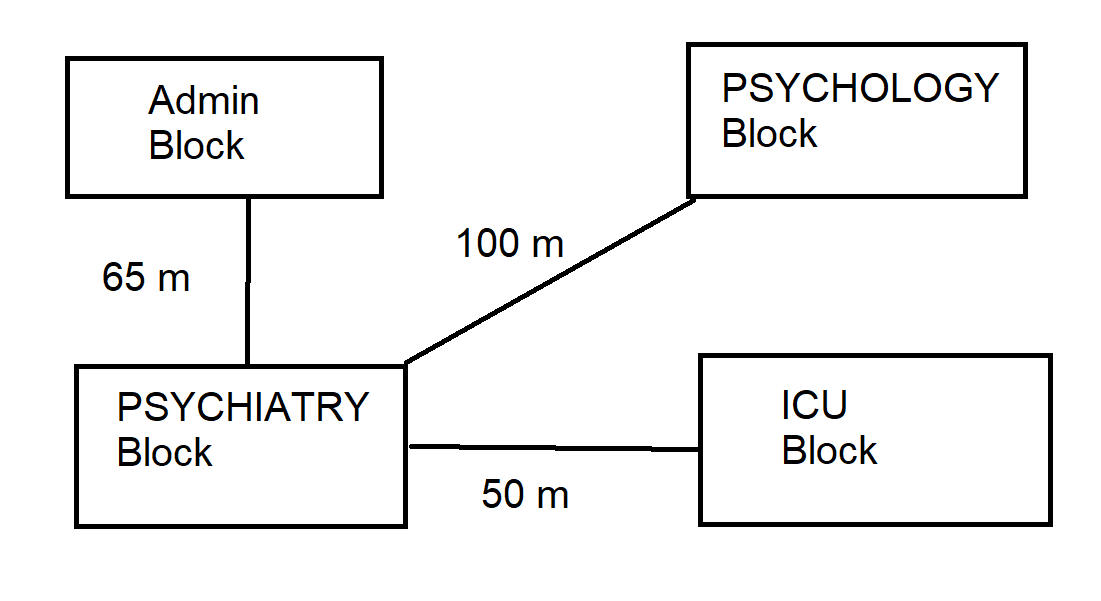
(i) Server should be placed in PSYCHIATRY Block, because it has the maximum number of computers

(ii) Switch

(iii)


Star Topology based on Server location

OR you can design using BUS topology for minimum distance


(iv)  Router should be placed in PSYCHIATRY Block

(v) 

(a) Telnet

(b) LAN

Sunday, 9 February 2025

लक्ष्य का निर्धारण


           *!! लक्ष्य का निर्धारण !!*
~~~~~~~~~~~~~~~~~~~~~~~~~~~~

एक बार की बात है, एक निःसंतान राजा था, वह बूढा हो चुका था और उसे राज्य के लिए एक योग्य उत्तराधिकारी की चिंता सताने लगी थी। योग्य उत्तराधिकारी के खोज के लिए राजा ने पुरे राज्य में ढिंढोरा पिटवाया कि अमुक दिन शाम को जो मुझसे मिलने आएगा, उसे मैं अपने राज्य का एक हिस्सा दूंगा। राजा के इस निर्णय से राज्य के प्रधानमंत्री ने रोष जताते हुए राजा से कहा, "महाराज, आपसे मिलने तो बहुत से लोग आएंगे और यदि सभी को उनका भाग देंगे तो राज्य के टुकड़े-टुकड़े हो जाएंगे। ऐसा अव्यावहारिक काम न करें।" 

राजा ने प्रधानमंत्री को आश्वस्त करते हुए कहा, ''प्रधानमंत्री जी, आप चिंता न करें, देखते रहें, क्या होता है।' निश्चित दिन जब सबको मिलना था, राजमहल के बगीचे में राजा ने एक विशाल मेले का आयोजन किया। मेले में नाच-गाने और शराब की महफिल जमी थी, खाने के लिए अनेक स्वादिष्ट पदार्थ थे। मेले में कई खेल भी हो रहे थे। राजा से मिलने आने वाले कितने ही लोग नाच-गाने में अटक गए, कितने ही सुरा-सुंदरी में, कितने ही आश्चर्यजनक खेलों में मशगूल हो गए तथा कितने ही खाने-पीने, घूमने-फिरने के आनंद में डूब गए। इस तरह समय बीतने लगा। पर इन सभी के बीच एक व्यक्ति ऐसा भी था जिसने किसी चीज की तरफ देखा भी नहीं, क्योंकि उसके मन में निश्चित ध्येय था कि उसे राजा से मिलना ही है। इसलिए वह बगीचा पार करके राजमहल के दरवाजे पर पहुंच गया। पर वहां खुली तलवार लेकर दो चौकीदार खड़े थे। उन्होंने उसे रोका। उनके रोकने को अनदेखा करके और चौकीदारों को धक्का मारकर वह दौड़कर राजमहल में चला गया, क्योंकि वह निश्चित समय पर राजा से मिलना चाहता था। जैसे ही वह अंदर पहुंचा, राजा उसे सामने ही मिल गए और उन्होंने कहा, 'मेरे राज्य में कोई व्यक्ति तो ऐसा मिला जो किसी प्रलोभन में फंसे बिना अपने ध्येय तक पहुंच सका। तुम्हें मैं आधा नहीं पूरा राजपाट दूंगा। तुम मेरे उत्तराधिकारी बनोगे। 

*शिक्षा:-*
सफल वही होता है जो लक्ष्य का निर्धारण करता है, उस पर अडिग रहता है, रास्ते में आने वाली हर कठिनाइयों का डटकर सामना करता है और छोटी-छोटी कठिनाईयों को नजरअंदाज कर देता है।

✍️✍️✍️✍️✍️✍️✍️✍️✍️✍️✍️✍️✍️

#spsharmag

Wednesday, 15 January 2025

Features of YouTube Shorts

As of October 2024, the maximum length of a YouTube Short is 3 minutes. Previously, the maximum length was 60 seconds. 

Explanation

  • YouTube Shorts are short-form videos that are intended to be highly consumable and quick. 
  • The default length for a YouTube Short is 15 seconds. 
  • A YouTube Short can be a single video or a combination of multiple 15-second clips. 
  • YouTube Shorts are intended to be viewed on mobile devices in a portrait orientation. 
  • YouTube Shorts have a 9:16 aspect ratio and a resolution of 1920 pixels by 1080 pixels. 
  • You can use audio from YouTube's library, other videos, or your own in a YouTube Short. 
  • You can create YouTube Shorts in the YouTube app or upload premade videos. 
  • You can add text, filters, effects, and stickers to your YouTube Short. 

Tuesday, 14 January 2025

Class 12 Computer Science Practical Exam

SUB: COMPUTER SCIENCE (CODE: 083), CLASS - 12

SET – 1

MAX MARKS: 30                                                                                                                                   TIMES: 3 HRS

Practical – 1:                                                                                                               08 Marks

Create a binary file with name and roll number. Search for a given roll number and display the name, if not found display appropriate message

Practical – 2: MySQL Queries:                                                                                   04 Marks

Consider the table “RESULT” given below and write MySQL queries for the following questions:

RollNo

Name

Class

Gender

City

Marks

1

Shiva

XII

M

Bhopal

453

2

Saanvi

X

F

Jaipur

551

3

Abhay

X

M

Delhi

553

4

Gauri

XI

F

Jaipur

458

5

Mansi

XII

F

Delhi

430

6

Aman

XII

M

Delhi

530


(a)   Display the details of class XII students in descending order of their marks.

(b)   Delete the column “Gender” from the table.

(c)    Display the city with number of students belongs to that city.

(d)   Change the city of ‘Gauri’ from ‘Jaipur’ to ‘Noida’.

3. Report File                                                                                                              7 Marks

4. Project                                                                                                                    8 Marks

5. Viva voce                                                                                                                3 Marks


Sign of Internal Examiner                                                                  Sign of External Examiner


SUB: COMPUTER SCIENCE (CODE: 083), CLASS - 12

SET – 2

MAX MARKS: 30                                                                                                                                   TIMES: 3 HRS

Practical – 1:                                                                                                               08 Marks

Create a binary file with roll number, name and marks. Input a roll number and update the marks.

Practical – 2: MySQL Queries:                                                                                   04 Marks

Consider the table “Emp” given below and write MySQL queries for the following questions:

ID

Name

Age

Gender

City

Salary

1

Shiva

25

M

Bhopal

34000

2

Saanvi

27

F

Jaipur

42000

3

Abhay

26

M

Delhi

55000

4

Gauri

28

F

Jaipur

45000

5

Mansi

25

F

Delhi

43000

6

Aman

28

M

Delhi

53000


(a)   Display the details of all employees in descending order of their salary.

(b)   Delete the column “Gender” from the table.

(c)    Display the city with number of employees belongs to that city.

(d)   Increase the salary by 10% of all employees.

3. Report File                                                                                                              7 Marks

4. Project                                                                                                                    8 Marks

5. Viva voce                                                                                                                3 Marks


Sign of Internal Examiner                                                                  Sign of External Examiner


SUB: COMPUTER SCIENCE (CODE: 083), CLASS - 12

SET – 3

MAX MARKS: 30                                                                                                                                   TIMES: 3 HRS

Practical – 1:                                                                                                               08 Marks

Write a menu driven program which insert, delete and display the details of a book such as book_id, book_name and price using Stack.

Practical – 2: MySQL Queries:                                                                                   04 Marks

Consider the table “SALES” given below and write MySQL queries for the following questions:

Code

Category

Sale

Profit

101

Cosmetics

24000

6500.34

102

Books

22500

4500.00

103

Stationary

31000

NULL

104

Gift

27500

2561.76

105

Baby Products

35000

1500.26


(a)   Display the average sale of all categories.

(b)   Add a new column named “Brand” of varchar (20) type.

(c)    Update the profit 4000 of category which profit is NULL

(d)   Display all the details in descending order of Sale.

3. Report File                                                                                                              7 Marks

4. Project                                                                                                                    8 Marks

5. Viva voce                                                                                                                3 Marks


Sign of Internal Examiner                                                                  Sign of External Examiner


SUB: COMPUTER SCIENCE (CODE: 083), CLASS - 12

SET – 4

MAX MARKS: 30                                                                                                                                   TIMES: 3 HRS

Practical – 1:                                                                                                               08 Marks

Write a menu driven program which insert, delete and display the details of an employee such as eid, ename and salary using Stack.

Practical – 2: MySQL Queries:                                                                                   04 Marks

Consider the table “Product” given below and write MySQL queries for the following questions:

ID

Name

Brand

Price

1

Keyboard

HP

850

2

Mouse

HP

450

3

Monitor

Sumsung

5500

4

Pen Drive

SanDisk

750

5

UPS

Microtek

1550


(a)   Display the details of all products in descending order of their price.

(b)   Find the average price of all products.

(c)    Display the name of products whose price is more than 1000.

(d)   Add a new column ‘Model’ with varchar(20) data type.

3. Report File                                                                                                              7 Marks

4. Project                                                                                                                    8 Marks

5. Viva voce                                                                                                                3 Marks


Sign of Internal Examiner                                                                  Sign of External Examiner